


I approached Kardia as a practical medical app rather than another health dashboard. Its purpose is focused: it helps put heart-care tools within reach, with AliveCor Inc. behind the product. The app is free, rated for Everyone, and sits in the Medical category. That combination makes it easy to consider, but the important question is not whether it is convenient to install. It is whether the experience fits the way you actually monitor your heart and communicate with healthcare professionals.
After spending time with it, my impression is that Kardia works best as part of a consistent routine. It is not a replacement for a clinical examination, an emergency service, or a doctor’s judgement. Instead, it is most useful when you want a structured way to take heart-related readings with compatible Kardia hardware and keep that information available for discussion. That distinction matters, because the app’s value depends as much on your workflow as on the software itself.
How Kardia feels in everyday use
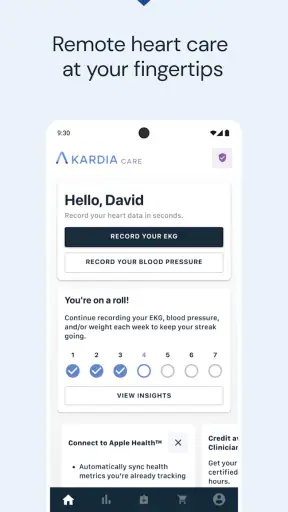
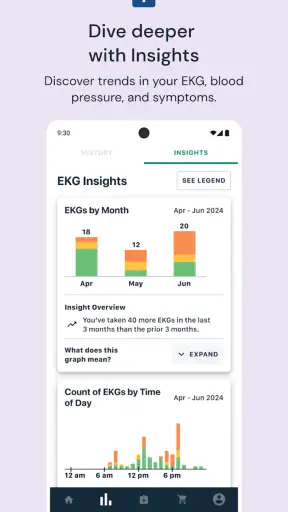
The first thing I noticed is that the app has a narrower purpose than a general fitness tracker. You are not opening it mainly to count steps, browse workouts, or watch broad wellness trends. The experience is centered on heart monitoring, so the useful question is usually immediate: can I take a reading now, understand what the app is showing me, and preserve the result in a way that helps with follow-up?
That focused design can make the app feel quicker than a larger health platform. There are fewer unrelated areas competing for attention, and the path from opening the app to heart-care activity is comparatively direct. In my experience, that matters during a moment of concern, when a complicated interface would only add frustration. The app feels most responsive when I use it for one clear task rather than trying to explore every available area at once.
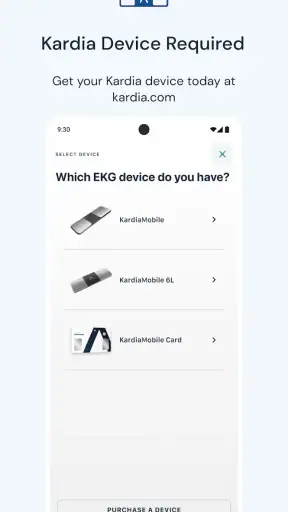
There is an important practical condition, though: Kardia is not a complete experience without compatible Kardia hardware. Installing the app alone does not turn a phone into a medical measuring device. This is one of the first points I would explain to a friend, because the free download can create an expectation that the phone itself will perform every function. The software is the organizing and viewing part of a broader monitoring setup.
That hardware relationship also affects perceived speed. If the device is nearby, ready to use, and positioned correctly, the process feels straightforward. If you need to locate it, prepare it, or repeat a reading because the contact was not clean, the delay is not really an app-performance problem. It is part of the measurement workflow. Kardia is at its best when you treat the reading as a small routine rather than something to rush through while moving around.
What happens when the app is used heavily
For occasional readings, I found the experience easier to judge than for long-term, intensive use. A single check is a simple interaction. The more demanding scenario is building a useful record over time: taking readings at different moments, keeping track of symptoms, and later finding the information that deserves attention. That is where organization becomes more important than raw launch speed.
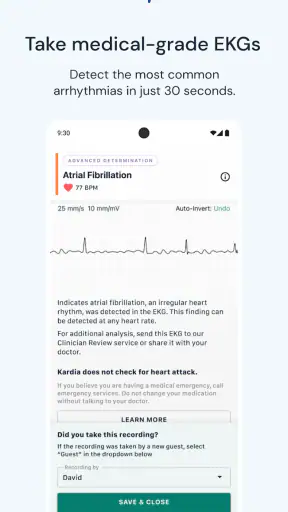
A realistic example would be someone who notices an unusual sensation during an evening at home. They can open Kardia, prepare the compatible device, take a reading, and save the result for later discussion. The real benefit is not merely seeing a result in the moment. It is having a repeatable process that may help connect what was felt with what was recorded. I would still avoid making a medical decision based only on an app result, but the record can make a conversation with a clinician more concrete.
Another demanding situation is travel. A user who normally keeps the hardware in one place may discover that the app is only as convenient as the complete kit they remember to carry. The phone can be present while the measuring accessory is at home. That is a subtle limitation, but it is more important than whether the interface takes an extra moment to open. Kardia rewards preparation: keep the compatible device accessible, keep the app ready, and decide in advance how you will record symptoms or context.
Long-term use can also expose a different kind of friction. A monitoring app is only helpful if you return to it consistently. If you take readings without a clear reason, the collection can become difficult to interpret. I prefer a simple personal rule: record when symptoms occur, when a healthcare professional has suggested a schedule, or when you have a specific question to investigate. That keeps the app from becoming a source of anxious checking.
On the resource side, Kardia does not present itself as a full-time activity tracker that constantly dominates the phone. Its main work happens when you open it and use the connected monitoring setup. That makes it feel more like an on-demand medical tool than an always-busy background companion. Still, the exact experience will depend on the phone, the accessory, and the way you use the app, so I would not choose it on the assumption that every device will behave identically.
Stability is more than a successful reading
For a medical app, reliability means more than avoiding crashes. I also want the process to be understandable, repeatable, and easy to recover when something goes wrong. Kardia’s focused purpose helps here because there are fewer unrelated tasks to confuse the user. A clear routine—open the app, prepare the hardware, take the reading, review it, and preserve the useful context—is easier to repeat than a scattered health-management process.
The weak point is that a reading can be affected by conditions outside the app. Movement, poor contact, interruptions, or an unsuitable moment can make the process less smooth. When that happens, I would not interpret the need to repeat a measurement as evidence that Kardia is unstable. I would first check the setup and follow the on-screen guidance carefully. The app is most dependable when the user treats the measurement as a controlled moment.
Recovery after an interrupted attempt is therefore important. If a reading does not complete, the sensible response is to pause, settle the hardware, and try again rather than repeatedly tapping through the interface. That small change in behavior makes the experience less stressful and usually gives the process a better chance of succeeding. It is a useful lesson for anyone who expects a medical app to behave like a one-tap consumer gadget.
I also think reliability includes knowing when not to continue. If someone is experiencing severe or urgent symptoms, they should not spend time trying to obtain a perfect app reading. Kardia can support routine monitoring and conversations with professionals, but it should never delay emergency care. This is not a criticism of the app; it is a boundary that applies to any home-monitoring tool.
Phone and accessory constraints to understand first
Kardia supports devices running Android 8.0 or later, which gives it a reasonably broad starting point for Android users. Even so, operating-system compatibility is only one part of the decision. The phone must also work well with the particular Kardia hardware you plan to use, and the overall setup needs to be comfortable enough that you will actually repeat it.
The accessory requirement is the biggest constraint for many people. If you want a general-purpose heart feature that works without separate hardware, a smartwatch or another wearable may feel more convenient. Those alternatives can be better for passive, everyday awareness because they are already worn. Kardia makes more sense for someone who prefers deliberate readings and a dedicated heart-care workflow rather than continuous lifestyle tracking.
That difference also changes how I think about portability. A phone is familiar and easy to carry, but the complete Kardia setup may still require planning. Before relying on it away from home, I would test the whole process in a calm setting. Confirm that the app opens, the accessory is available, and you understand how to take a clean reading. Doing that in advance is more useful than discovering the workflow during a stressful moment.
The age rating of Everyone makes the app broadly approachable from a content perspective, but that should not be confused with medical suitability for every person. Children, older adults, and people managing complex heart conditions may need help interpreting results or deciding what action to take. The app can be accessible while the medical context remains personal and complicated.
Where it fits beside ordinary alternatives
Compared with a basic fitness app, Kardia is more specialized and more serious. A fitness platform may show broad trends such as activity or pulse-related information, but it is not designed around the same deliberate heart-reading routine. If your goal is exercise motivation, Kardia is probably too narrow. If your goal is to capture heart-related information for a focused discussion with a professional, its specialization is an advantage.
Compared with a smartwatch, the trade-off is convenience versus intentional measurement. A watch can be easier for quick checks because it is already on your wrist. Kardia’s approach may appeal more to someone who does not want to wear a device continuously or who wants a dedicated process rather than a stream of general wellness notifications. Neither option is automatically better; the right choice depends on whether you value passive access or controlled readings.
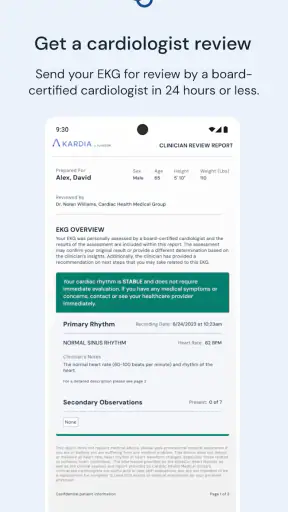
Compared with visiting a clinic, Kardia offers convenience but not the same setting, equipment, or professional oversight. It can help you collect information between appointments, but it does not turn home monitoring into a clinical consultation. I would describe it as a bridge for communication, not a substitute for medical care.
The free price removes one obvious barrier to trying the software, although the broader hardware setup still matters to the total decision. I would not call the app a completely cost-free heart-monitoring solution simply because the download costs nothing. Think of the app as one part of a system, and decide whether that system matches your needs before building a routine around it.
Who will get the most from it
I think Kardia is a strong fit for people who have a clear reason to monitor their heart, want readings they can revisit, and are willing to follow a repeatable process. It can also suit users who prefer a dedicated medical app over a crowded wellness platform. The fact that it has reached over a million installs and carries a 4.7 average from around sixty-four thousand ratings suggests that many people find this focused approach worthwhile, although popularity alone should not decide whether it is appropriate for you.
It is especially useful when you want to prepare for a healthcare conversation. Instead of relying entirely on memory, you can build a record around particular moments and symptoms. My practical advice is to write down the situation in ordinary language: what you felt, when it happened, what you were doing, and whether the reading was taken at rest. That context can be more valuable than collecting isolated readings with no explanation.
I would be more cautious about recommending it to someone who wants automatic monitoring with no user involvement. Kardia asks you to participate in the process, keep the hardware available, and understand the limits of the result. Someone who dislikes deliberate check-ins may use it inconsistently, which reduces its usefulness. A wearable or clinician-directed alternative may be a better match for that person.
I would also hesitate to recommend it as a reassurance tool for repeated anxious checking. Opening a heart-monitoring app every few minutes can make worry feel more central rather than resolving it. A defined plan from a healthcare professional is a healthier way to decide when monitoring is appropriate.
Small habits that improve the experience
My first tip is to create a quiet measurement spot. It does not need to be elaborate; a chair, a stable surface, and easy access to the compatible hardware are enough. The goal is to remove avoidable movement and searching. When the setup is always in the same place, the app feels faster because you have eliminated the preparation that often causes delays.
My second tip is to separate measurement from interpretation. Take the reading carefully, save the relevant context, and discuss concerning or confusing results with a qualified professional. Do not turn an app label into a diagnosis by itself. This habit protects against both false reassurance and unnecessary panic.
My third tip is to review your routine rather than obsess over individual results. If you are using Kardia over weeks or months, ask whether the readings are answering a real question. If they are not, speak with a clinician about what should be monitored and how often. A smaller, purposeful record is usually easier to communicate than a large collection gathered without a plan.
Finally, test recovery before you need it. Take a normal reading when you feel well, then learn what you would do if the process were interrupted or had to be repeated. Familiarity reduces pressure. It also helps you distinguish a setup problem from a result that genuinely deserves medical attention.
My performance verdict
In performance terms, Kardia feels appropriately focused rather than overloaded. It is quick enough for the central task when the phone and compatible hardware are ready, and its resource demands feel more like an on-demand medical utility than a constantly active fitness platform. The biggest delays are more likely to come from preparation, positioning, or repeating a measurement than from the app itself.
Its stability is strongest when used as intended: deliberate readings, a calm environment, and sensible follow-up. The experience becomes less convincing if you expect the phone alone to do everything, want passive monitoring, or treat every result as a final medical answer. Those are not minor details; they define whether the product feels helpful or disappointing.
AliveCor Inc. has kept the concept clear, and the current version, 5.60.0-44874b971e, represents a mature app that has been available since October 3, 2013. I would recommend trying it to someone who has a genuine heart-monitoring use case and is comfortable with the required hardware and clinician-guided boundaries. I would steer a casual fitness user toward a broader health app, and someone seeking urgent reassurance toward professional care instead.
My final view is positive but measured: Kardia is valuable because it gives a focused place for home heart-care readings, not because it promises to replace the healthcare system. If you prepare the setup, use it consistently, record useful context, and respect its limits, it can become a practical part of your routine. If you want effortless, continuous tracking from the phone alone, I would choose a different kind of tool.


